Image Source: AI Generated from Promeai.pro
Don’t you hate it when your images feel confined by their borders? We’ve all faced that moment of frustration with a perfectly captured photo that’s too tightly cropped, or a social media banner that needs more background space.
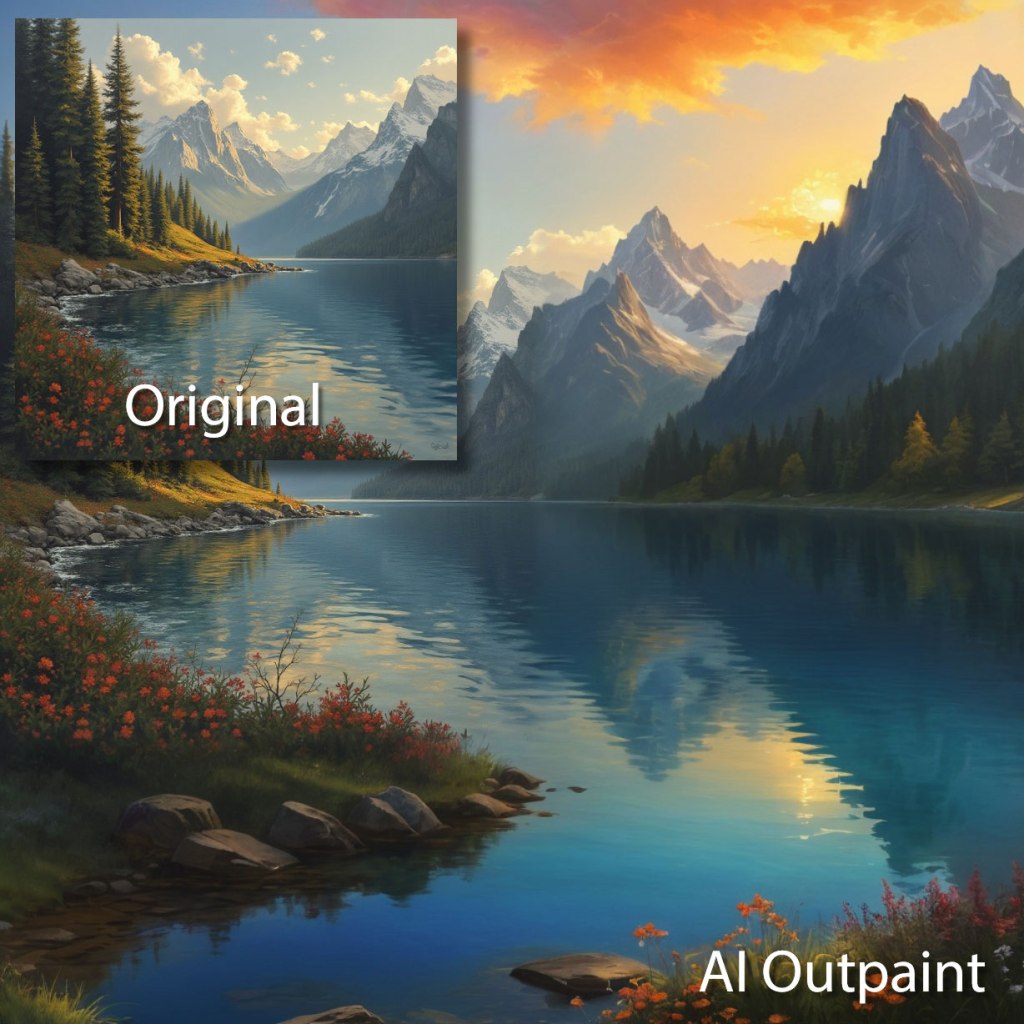
Outpainting AI breaks these creative barriers. This innovative technology lets you expand images beyond their original frames and creates natural, professional-looking extensions. The technology helps hobbyist photographers, social media creators, and small business owners revolutionize their visual content creation process.
This detailed guide covers everything about outpainting. You’ll discover how to employ this powerful tool to boost your creative projects and tackle common image editing challenges. The guide walks you through simple concepts and practical applications effectively.
Understanding AI Outpainting Basics
The world of outpainting AI fascinates many creators, so let’s break down how it can boost your creative projects.
What is outpainting and how does it work
Outpainting is an innovative AI technique that helps you expand images beyond their original boundaries. Picture having a magical canvas that grows – your beach photo might show just the shoreline, but outpainting reveals more ocean, sky, or surrounding landscape that wasn’t there before.
The AI analyzes your image’s existing elements – colors, patterns, textures, shadows and reflections. This understanding helps generate new content that naturally extends beyond the original borders. Your results will look best if you keep the transparent area to about 25% of your selected region.
Key differences between outpainting and inpainting
These techniques serve different purposes though they might sound alike. Outpainting extends content beyond image borders, while inpainting fills or replaces specific areas within the existing image. Think of it like expanding your canvas versus touching up what’s already there.
Outpainting stands out because it understands deeper context rather than just surface-level details. This deeper understanding creates more appropriate and creative extensions of your images.
Benefits of using outpainting for creative projects
Outpainting brings several advantages that make it a valuable addition to your creative toolkit:
- Enhanced Composition: Your original image gets better visual balance with complementary elements
- Added Depth: The technique adds context and creates immersive visual experiences
- Creative Freedom: You can push beyond original image boundaries to explore new dimensions
- Time Efficiency: AI automation cuts down the time compared to manual image extension
- Natural Integration: The system blends new elements naturally by considering existing shadows and reflections
Photographers, designers, and content creators can tell better visual stories with outpainting. This tool helps discover creative possibilities beyond image boundaries, whether you work on social media content, portfolio pieces, or client projects.
Getting Started with Outpainting Tools
Let’s dive into the tools that can help bring your creative ideas to life. Here’s a practical guide to pick and use the right outpainting platform that fits your needs.
Popular outpainting platforms comparison
The AI outpainting landscape offers several excellent options that suit different skill levels and requirements:
| Platform | Key Features | Best For |
|---|---|---|
| DALL-E | Unlimited generations with subscription | Professional creators |
| Adobe Firefly | Seamless Creative Cloud integration | Adobe suite users |
| Stable Diffusion | Open source and free | Technical users |
| DreamStudio | Multiple AI model support | Versatile creators |
Free vs paid outpainting options
Pricing structures vary substantially between platforms. Some tools give you free tiers while others need subscriptions or credit-based systems. DALL-E uses a credit system with limited free generations. Adobe Firefly comes as part of Creative Cloud subscriptions.
Beginners should try free options like Stable Diffusion to play around with outpainting before spending money on paid solutions. This helps you figure out what you need without any upfront costs.
Setting up your first outpainting project
Here’s a simple breakdown to start your outpainting experience:
- Choose Your Platform: Pick a tool that matches your technical comfort level
- Prepare Your Image: Upload a high-quality source image
- Define Your Objectives: Figure out what you want from the expansion
- Adjust Dimensions: Pick the width and height for your expanded image
- Review and Refine: Look at the results and tweak as needed
The best results come from expanding one direction at a time. Make sure you have at least 20% overlap between your original image and the expansion area. This keeps your final output consistent and high-quality.
Essential Outpainting Techniques
Your outpainting results will improve substantially once you master the technical aspects. Here are our best techniques to create seamless image expansions.
Writing effective outpainting prompts
The right prompt is a vital part of successful outpainting. Clear and specific instructions produce the best results. Here’s our tested approach:
- Be descriptive: Include details about what you want the AI to add (e.g., “Add pine trees and mountain backdrop”)
- Focus on style: Mention your desired artistic style (e.g., “impressionist-style clouds”)
- Maintain context: Describe the whole image, including parts that won’t change
Understanding image expansion options
These parameters need your attention while working with expansion settings:
- Strength Value: Controls the intensity of outpainting effects. Higher values create more pronounced changes
- Offset Controls: Adjusts horizontal (X) and vertical (Y) displacement from original boundaries
- Guidance Scale: Influences detail level and coherence in generated output
The best results come from expanding one direction at a time. This gives you better control over the final outcome and helps maintain image quality.
Troubleshooting common issues
Here are the most common challenges and their solutions:
- Visible Seams
- Use inpainting models to blend better
- Adjust mask blur settings to create smoother transitions
- Apply low denoising strength to make subtle modifications
- Inconsistent Style
- Start with high-resolution images to get better quality
- Use prompts that complement existing content
- Work in smaller sections for complex scenes
Increasing the sampling steps creates smoother transitions between original and outpainted areas. Complex backgrounds integrate better with the original image when you adjust the denoising strength.
Note that you should try different prompt formats and refine them based on results. This process helps you develop an instinct for what works best in different situations.
Creating Your First Outpainting Project
Ready to create your first outpainting project? Let’s walk through the process to help you work with confidence and precision.
Step-by-step guide to expanding images
The outpainting process breaks down into these simple steps:
- Upload Your Image: A high-resolution image will give you the best results
- Select Expansion Area: The area selection tool helps you mark edges that need expansion
- Set Parameters: Your best results will come with denoising strength between 0.6 and 1.0
- Craft Your Prompt: Clear instructions about your desired additions make all the difference
- Generate Options: Take time to review different variations before picking the best one
- Fine-tune Results: Small adjustments help create perfect integration
Best practices to achieve quality results
Quality outpainting depends on careful preparation and execution. These proven practices will help you succeed:
Clean, high-quality source images create sharper results. Your control improves when you extend less than 40% of the frame at once. The generation parameters should be saved in PNG metadata for later reference. Specific artistic styles in prompts lead to consistent outcomes. Portrait work requires careful attention to face restoration settings.
Common mistakes to avoid
Data quality problems and insufficient human oversight often create challenges in outpainting. Here’s what you need to watch for:
- AI has limits with complex scenes and intricate details. Complex areas work better when broken into smaller sections. Regular quality checks help maintain consistency throughout the project.
- Clear objectives make a huge difference. Setting specific goals and success metrics before you start guides your prompt writing and parameter choices. This approach helps you stay focused on the desired outcome.
- Patience plays a crucial role – your AI might need several attempts to nail the result.
- Each generation deserves careful review and refinement. Smooth transitions between original and generated content often improve with adjusted denoising strength and sampling steps.
Practical Applications for Individuals
Our deep dive into outpainting AI has shown us countless ways to boost your creative work. Let’s tuck into some practical applications that will transform your projects.
Personal creative projects and artwork
Outpainting brings exciting possibilities for artistic expression. Artists now push their creative boundaries in new ways. The technology lets them expand landscape photography, develop conceptual art, and create immersive storytelling visuals.
AI’s most powerful impact shows up in helping artists with physical limitations or those without formal training. A new generation of artists emerges as AI breaks down barriers caused by physical disabilities, time constraints, or limited access to art education.
Here’s how artists successfully employ outpainting:
- Extending classic paintings while preserving their essence
- Creating panoramic landscapes from standard shots
- Developing conceptual art pieces
- Building immersive visual narratives
- Experimenting with different artistic styles
Social media content creation
Standing out on social media matters more than ever. Outpainting has become a game-changer for content creators. The technology helps generate high-quality art and graphics that make social media pages and blogs look stunning instantly.
Outpainting’s value shines through its adaptability across platforms. Users can now:
- Adjust aspect ratios for various social platforms
- Create extended backgrounds for banner images
- Develop consistent visual themes
- Generate multiple variations of the same image
Portfolio enhancement techniques
We’ve found several powerful strategies for portfolio development using outpainting. The system looks at existing shadows, reflections, and textures to ensure newly-generated content appears natural. This precision helps maintain professional quality throughout your portfolio.
| Portfolio Element | Outpainting Application | Benefit |
|---|---|---|
| Landscape Photos | Expand scenic views | Creates immersive experiences |
| Portrait Work | Add environmental context | Tells fuller stories |
| Product Images | Extend backgrounds | Provides lifestyle context |
| Concept Art | Develop larger scenes | Shows creative vision |
Digital artists find exceptional success when they use outpainting to extend their work’s borders. This approach creates more dynamic presentations and showcases versatility in their portfolio.
Building a professional presence works best with consistent style across expanded images. The AI maintains coherent shadows and reflections to create that polished, professional look your portfolio needs to stand out.
Note that successful portfolio enhancement needs strategic application. Start with your strongest pieces and expand them gradually to create influential presentations that tell compelling visual stories.
Conclusion
AI outpainting has revolutionized image editing and creative projects. A tool that initially helped expand cramped photos has evolved into an essential resource for artists, content creators, and professionals. The right mix of tools, techniques, and practice enables users to create natural and professional-looking image expansions.
This technology shines through its simplicity – impressive results don’t require years of photo editing experience. The principles and practices we’ve covered will enhance your work, whether you edit personal photos, create social media content, or build a professional portfolio.
Our free newsletter keeps you updated about platforms that deliver optimal results for your photo editing needs. Subscribe below to stay informed.
Success in outpainting requires experimentation and patience. Your journey should begin with simple projects. Understanding the simple techniques first allows you to tackle more complex expansions later. These techniques will help you expand creative limits and bring your visual concepts to reality.
FAQs
What exactly is AI outpainting and how does it work? AI outpainting is a technique that allows you to expand images beyond their original boundaries. It analyzes existing elements like colors, patterns, and textures to generate new content that seamlessly extends the image. This technology is particularly useful for enhancing composition and adding depth to visual projects.
How does outpainting differ from inpainting? While outpainting focuses on extending content beyond an image’s borders, inpainting works within the existing image to fill or replace specific areas. Outpainting is like expanding your canvas, whereas inpainting is more about touching up what’s already there.
What are some popular platforms for AI outpainting? There are several outpainting platforms available, each with unique features. Some popular options include DALL-E, Adobe Firefly, Stable Diffusion, and DreamStudio. These platforms cater to different skill levels and needs, ranging from free open-source options to subscription-based services with advanced features.
What are some best practices for achieving quality results with outpainting? To achieve the best results, start with high-quality source images, extend less than 40% of the frame at a time, use specific prompts that include desired artistic styles, and save generation parameters for future reference. It’s also important to review and adjust settings as needed, especially when working with portraits.
How can individuals use outpainting for personal creative projects? Outpainting offers numerous creative possibilities for individuals. It can be used to extend landscape photography, develop conceptual art, create immersive storytelling visuals, and enhance social media content. Artists can use it to experiment with different styles, while content creators can adapt images for various platforms and aspect ratios.

 PixelOne.AI
Leave a comment