
Image Source: AI Generated from Promeai.pro
Making eye-catching YouTube thumbnails was a huge time sink for me. Professional design tools didn’t help much. I struggled to create that viral-worthy look that top creators seemed to nail without effort. But everything changed after I found AI YouTube thumbnail generators.
Pikzels AI and similar tools have changed how creators make thumbnails today. Pikzels stands out as a free AI YouTube thumbnail generator that produces professional-grade thumbnails in minutes instead of hours. I created this detailed guide to help you become skilled at using Pikzels AI and boost your YouTube channel’s visual appeal. You’ll learn everything from simple setup to advanced features that will help you create stunning thumbnails to boost clicks and viewer engagement.
Who Should Consider Using a Service Like Pikzels?
Pikzels is ideally suited for content creators who need professional-quality thumbnails but want to save time on design work. The platform specifically caters to:
Content Creators and YouTubers
The platform’s rapid 30-second thumbnail generation makes it perfect for creators maintaining consistent posting schedules. Its FaceSwap technology and customization options help maintain brand recognition across videos.
Social Media Managers
Marketing professionals managing multiple channels benefit from Pikzels’ batch creation capabilities and diverse thumbnail formats. The platform’s ability to recreate successful thumbnails from existing content helps maintain consistent visual branding.
Video Producers and Editors
The tool’s AI-powered title generation and thumbnail recreation features streamline the post-production workflow. This is particularly valuable for teams producing high volumes of video content.
Digital Marketing Specialists
Those focused on improving click-through rates and engagement will appreciate Pikzels’ ability to create eye-catching thumbnails that align with proven psychological triggers. The platform’s understanding of thumbnail psychology helps create designs that drive viewer interest.
Brand Managers
The platform’s customization options and consistent style generation make it valuable for maintaining brand identity across video content. The ability to fine-tune colors, sizes, and layouts ensures all thumbnails match brand aesthetics perfectly.The platform works especially well for users who:
- Need to create multiple thumbnails regularly
- Want to maintain consistent branding
- Lack advanced design skills
- Focus on creating viral or attention-grabbing content
- Value quick turnaround times in their workflow
Understanding Thumbnail Psychology
Let’s explore the fascinating world of thumbnail psychology. Research shows that understanding what makes viewers click helps create better-performing thumbnails. The numbers are striking – 90% of top-performing videos use custom thumbnails.
Elements of viral thumbnails
My experience shows that viral thumbnails share three core elements:
- Visuals that catch attention and stand out
- Simple messages you learn at first glance
- A clever curiosity gap that pulls people in
Keeping things simple makes a big difference. Eye-catching colors and composition work well, but cluttered designs can push viewers away.
Color psychology for engagement
Color psychology has changed how I create thumbnails. Each color speaks to different emotions – red creates excitement and urgency, blue builds trust, and yellow brings optimism. The thumbnails really stand out in busy feeds when you use contrasting colors.
Emotional triggers in thumbnails
Emotional connection is our most powerful tool for thumbnails. Curiosity drives people to click more than anything else. The sort of thing I love is how surprised expressions or intriguing scenes create a “curiosity gap” – the space between what people know and want to learn.
Strong emotional expressions in thumbnails work really well. These expressions connect with our natural instincts, whether they show excitement, surprise, or wonder. The thumbnails need to stay authentic while triggering these emotions. This builds viewer trust over time.
Getting Started with Pikzels AI
Let me show you how easy it is to create stunning thumbnails with Pikzels AI. The platform has a quick setup process that gets you designing in minutes.
Setting up your Pikzels account
Pikzels required a Discord account to access it’s platform. Head over to Pikzels.com to try the service for free and generate your first 5 thumbnails without a credit card. After you sign up, you’ll see different pricing tiers – from Essential at $14/month to Ultimate at $56/month with annual billing.
Understanding the interface
The platform gives you two main ways to create:
- Prompt-to-thumbnail: Type what you envision
- Recreate option: Copy the style of thumbnails that work
You can fine-tune your thumbnails through the edit button until they look just right. Each thumbnail needs 10 credits, and extras like FaceSwap and title generation cost 3 credits each.
The platform’s accessible interface works well for users of all skill levels. You can even create thumbnails using prompts in any language.
Mastering Thumbnail Generation
Learning the simple techniques helped me find that creating stunning thumbnails depends on three essential elements. Here’s my tested approach that delivers great results consistently.
Writing effective prompts
You can get exactly what you want by writing clear, specific prompts. The best results come from prompts that include:
- Subject description and mood
- Visual style priorities
- Color scheme and composition
- Specific details about text placement
Customizing generated thumbnails
Pikzels’ customization options make fine-tuning your thumbnails easy. Colors, sizes, and layouts can be adjusted until they match your brand’s esthetic perfectly. You can make changes right after generation through the chat or by using the dedicated button.
The system’s quick implementation of changes impresses me. You describe what needs modification and the AI adapts the thumbnail to your priorities. This flexibility will give each thumbnail the power to catch attention while keeping your channel’s look consistent.
Recreating successful thumbnails
Knowing how to recreate successful thumbnails from other videos stands out as my favorite feature. The process is simple – I paste a link to a thumbnail I like and ask for specific changes. The AI converts it in just 30 seconds, which saves me hours of trying to copy winning designs.
Working with text overlays
Pikzels makes text integration simple and straightforward. The new text overlay feature lets creators add compelling text without design skills. These text elements serve multiple purposes:
- Title emphasis and branding
- Call-to-action messages
- Key video highlights
- Brand consistency elements
Batch thumbnail creation
Batch creation saves me the most time. Pikzels subscription plans give you unlimited thumbnail creation when you need ongoing thumbnail generation. This helps me prepare thumbnails for multiple videos ahead of time and keeps my channel’s quality consistent.
The platform lets me fine-tune designs through direct communication that matches my priorities. I can request specific adjustments through the dedicated button or chat interface, and the AI is quick to make these changes.
Sample Results: Iterative Refinement for Viral Thumbnails
I tested Pikzels AI to generate thumbnails aimed at maximizing click-through rates. The results were promising but highlighted the importance of iterative refinement to achieve the desired outcome. Here’s a breakdown of my experience and insights:
Initial Results and Iterative Refinement
The first few generations using Pikzels produced visually appealing thumbnails, but they often required several iterations to align perfectly with my vision. For example:
- Visual Composition: While the AI captured the general theme (e.g., emotional expressions or vibrant colors), some details, like facial proportions or object placement, needed fine-tuning.
- Text Integration: Including text in prompts added complexity. Occasionally, the AI-generated text contained minor spelling errors or formatting inconsistencies, which required manual corrections.
Prompt:
A shocked person’s face (close-up) with exaggerated emotions, bold text saying ‘YOU WON’T BELIEVE THIS!’ in bright red and yellow, and a blurred background of a mysterious object.
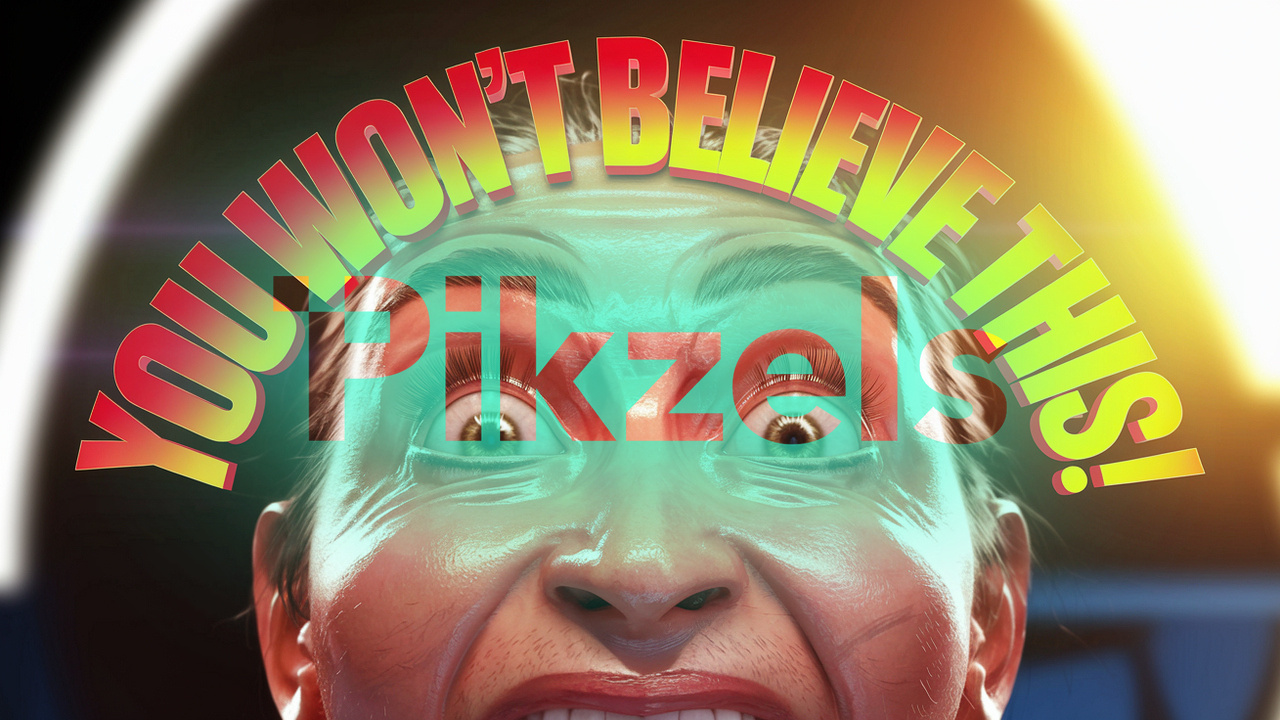
Additional prompting would be needed in my opinion to make this less ‘scarry clown-faced’ and more realistic. The text rendering worked well.
Prompt:
A hyper-realistic scene of an intense battle in Fortnite, with glowing effects, dynamic lighting, and bold text reading ‘EPIC WIN!’ in neon green.

Overall, this image generated exceptionally well and would be ready, in my opinion for use.
Prompt:
A close-up of colorful craft materials on one side and an eye-catching finished product on the other, with bold pink text saying ‘EASY DIY HACK!’ over a clean white background.
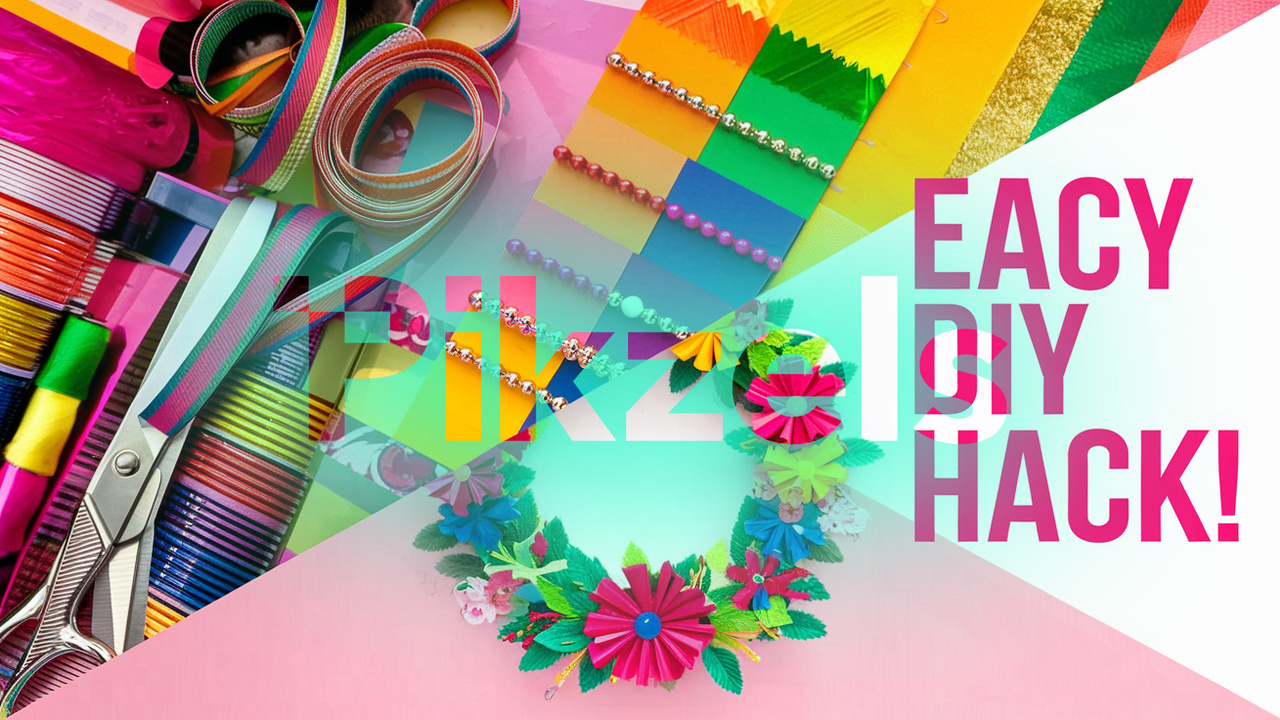
Graphically, I feel this is a great design other than the spelling error in the text.
Challenges with Text in Thumbnails
One notable challenge was generating accurate text overlays directly through Pikzels. While the platform can integrate text into thumbnails, issues like:
- Misspelled words
- Misaligned text
- Overly generic font styles were common in initial generations.
To address this, it may be more effective to use Pikzels for generating the core visual elements and then add precise text overlays using a secondary design tool like Canva or Photoshop. This hybrid approach ensured that the final thumbnail matched my exact branding and messaging requirements.
Key Takeaways from My Results
- Iterative Generations are Essential: Expect to refine your prompts multiple times to achieve professional-quality results. Each iteration improves alignment with your vision.
- Text Handling Requires Extra Attention: While Pikzels can include text, using another platform for final text edits ensures accuracy and branding consistency.
- Efficiency Gains: Even with iterative adjustments, Pikzels significantly reduced the time spent compared to designing thumbnails manually or outsourcing.
Cost-Benefit Analysis of Thumbnail Production Methods
Pikzels Subscription Model
The platform offers three pricing tiers with annual billing discounts: Essential at $14/month, Premium at $28/month, and Ultimate at $56/month. Each thumbnail costs 10 credits, with additional features like FaceSwap and title generation costing 3 credits each.
Compared to Freelance Services
Freelance thumbnail designers on platforms like Fiverr typically charge:
- Basic thumbnails: $5-30 per design
- Original artwork thumbnails: Hundreds of dollars
- Bulk orders: Around $11 per thumbnail for packages of 25
DIY Methods
Self-design options include:
- Canva: Free with basic templates, or $99/year for premium features
- Photoshop: Monthly subscription cost plus time investment
- Free alternatives: GIMP, Pixlr
Value Proposition
Pikzels offers superior value through:
- 30-second thumbnail generation versus hours of design work
- Unlimited revisions without additional costs
- Consistent quality across all thumbnails
- AI-powered features like FaceSwap and title generation
- No need for design skills or expensive software
Time Investment
While DIY methods are cheaper upfront, they require significant time investment:
- Professional designers typically spend 20-40 minutes per thumbnail
- Self-design requires learning curve and ongoing time commitment
- Pikzels reduces creation time to seconds, allowing creators to focus on content production
The platform particularly shines for creators who need regular thumbnail production, as the subscription model becomes more cost-effective than paying per thumbnail through freelance services
Managing credits efficiently
Smart credit management is a vital part of using Pikzels. Credits reset on your renewal date, but you can pick the ‘Credit Rollover’ feature during checkout. Here’s how to get the most value:
- Start with simple generations to test prompts
- Save FaceSwap for when you really need it
- Plan your batch creations ahead
Note that each thumbnail modification costs 10 credits. Taking time to craft precise prompts from the start pays off. You’ll need an active subscription to use any credits you’ve saved up.
Conclusion
My experience with Pikzels AI has turned thumbnail creation from a time-consuming task into a simplified process. This piece shows how thumbnail psychology, better prompt writing, and advanced features can help you create eye-catching thumbnails that boost viewer interest.
The platform excels at generating professional-quality thumbnails in seconds. Pikzels provides the flexibility and tools you need for success, whether you’re creating one thumbnail or dozens at once. Features like FaceSwap and text overlays make it easy to keep your channel’s brand consistent.
You might face challenges during creation, but the solutions provided will help you guide through common problems. Smart credit management and precise prompt writing will maximize your platform value.
AI thumbnail generation evolves faster each day. Our newsletter keeps you informed about the latest AI photo developments. YouTube’s growth makes tools like Pikzels AI crucial for content creators who want their videos to shine in busy feeds.
Note that your video’s first impression depends on its thumbnail. Time spent learning and improving your Pikzels AI skills will boost your click-through rates and channel growth.
FAQs
Can AI tools really create effective YouTube thumbnails? Yes, AI tools like Pikzels can generate professional-quality YouTube thumbnails in minutes. These tools use advanced algorithms to create eye-catching designs based on your input, saving time and potentially improving click-through rates.
What elements make a YouTube thumbnail go viral? Viral YouTube thumbnails typically include attention-grabbing visuals, clear messaging, and a strategic curiosity gap. They often use contrasting colors, strong emotions, and simple designs that stand out in crowded feeds.
How do I use Pikzels AI to create custom thumbnails? To use Pikzels AI, sign up for an account, navigate to their interface, and choose between prompt-to-thumbnail or recreate options. Write clear, specific prompts describing your desired thumbnail, and use features like FaceSwap and text overlays to customize your design.
What are some advanced features of Pikzels AI for thumbnail creation? Pikzels AI offers advanced features such as recreating successful thumbnails from other videos, adding text overlays, and batch thumbnail creation. These features allow for efficient production of multiple high-quality thumbnails that maintain brand consistency.
How can I improve the quality of AI-generated thumbnails? To improve AI-generated thumbnail quality, focus on writing precise prompts with detailed descriptions. Use square dimensions for optimal output, and take advantage of customization options to refine colors, sizes, and layouts. Additionally, test different approaches and learn from the results to continually improve your designs.


 PixelOne.AI
Leave a comment